

Table of Contents
Your Ultimate Guide to Professional AV Racks: Design, Installation, and Peak Performance
Professional AV racks are the essential foundation for any high-performing audiovisual setup. They bring all your equipment together, simplify wiring, and ensure optimal airflow for lasting reliability and top-tier performance. This guide dives deep into what AV racks do, how to pick the right one, the ins and outs of installation, smart ways to optimize your system, must-have accessories, common troubleshooting tips, and how to find expert installation services. We’ll walk you through each step, offering practical advice and highlighting how Multimedia Technology Group’s specialized services, including our Home Theater Installation Services and comprehensive AV Rack Installation, can elevate your system.
What Exactly Are AV Racks and Why Are They Crucial for Your Audiovisual Gear?
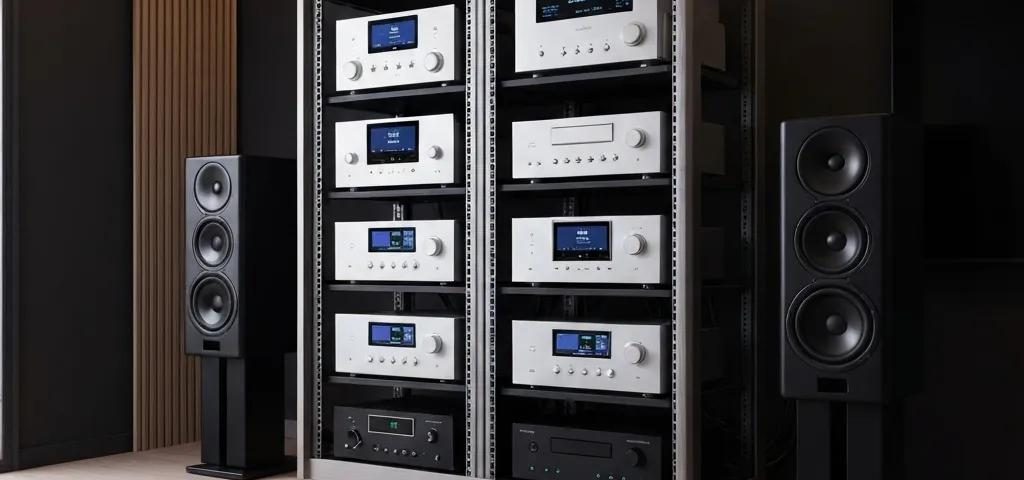
AV racks are specially designed enclosures built to house and organize your amplifiers, receivers, media players, network switches, and all related hardware in a neat, secure, and accessible way. Featuring standardized rack-unit (U) spacing and built-in mounting points, AV racks not only protect your valuable equipment from physical damage but also make system maintenance a breeze. Plus, they incorporate vital cooling features, like vented panels and fan systems, to prevent overheating, which is key to extending equipment life and ensuring it always performs at its best.
What Is an AV Rack and How Does It Tidy Up Your Audiovisual Equipment?
An AV rack is essentially a sturdy frame with vertical rails spaced precisely 1.75 inches apart—this measurement is known as a rack unit, or U. This standardized spacing allows you to mount all your gear neatly in a single column. This organized approach makes labeling, power distribution, and connecting everything much simpler. It also helps reduce signal interference by keeping cables separate and organized, ensuring your audio, video, and data signals stay clean and clear.
How Do AV Racks Boost Performance and Keep Your Equipment Running Longer?
By promoting unimpeded airflow and supporting active cooling fans, AV racks maintain ideal internal temperatures, significantly reducing the thermal stress on electronic components. Integrated power distribution units (PDUs) provide stable, consistent voltage, while lockable doors and secure side panels keep dust out and unauthorized access at bay. All these elements work together to minimize downtime, prevent premature equipment failure, and ensure your system delivers peak performance year after year.
What Sets AV Racks Apart from Server Racks?
While both rack types typically share a standard 19-inch width, AV racks are specifically engineered with front-to-back airflow management, acoustic dampening to minimize noise, and specialized cable routing solutions for audio and video signals. Server racks often focus on high-volume network airflow but may lack the aesthetic considerations or vibration isolation that sensitive AV equipment demands. Choosing the right rack type is crucial for ensuring your gear has the precise environmental controls and accessibility it needs.
Choosing the Perfect AV Rack: Understanding Types, Sizes, and Key Features
Selecting the right AV rack means finding the perfect balance between the number of devices you need to house, the space you have available, and how much customization you desire. Getting a handle on the different rack categories and measurement standards is your first step toward a system that’s both technically sound and aesthetically pleasing in your environment.
Exploring the Main Types of AV Racks: Residential, Commercial, Wall-Mount, and Floor-Standing

Open and enclosed floor-standing racks offer substantial capacity, often up to 45U, making them ideal for data centers or broadcast studios. For smaller setups in offices or retail spaces, wall-mount racks (typically 4–12U) provide a secure, space-saving solution. Residential AV racks are often designed as stylish cabinets that blend seamlessly into living areas, housing home theater equipment discreetly. In boardrooms and classrooms, commercial racks are built for high-density equipment and often feature finishes that complement corporate interiors.
How to Nail the Right AV Rack Size: Grasping Rack Units (U), Depth, and Width
Rack capacity is measured in rack units (U), where each U represents 1.75 inches of vertical space. The depth you need depends on the longest piece of equipment, plus extra room for cable bends—plan for around 24 to 30 inches for commercial gear and 18 to 22 inches for typical AV receivers. The standard 19-inch width accommodates most industry-standard equipment, though custom widths are available for larger amplifiers. Always factor in potential future expansion to ensure your rack won’t become obsolete too quickly.
Understanding EIA-310-D: The Industry Standard for 19-inch Racks
The Electronic Industries Alliance (EIA) 310-D standard sets the specifications for 19-inch rack cabinets, ensuring consistency in features like rack units (U), hole spacing, rack opening dimensions, and front panel width. This standardization is vital for guaranteeing equipment compatibility and straightforward mounting across a wide range of electronic devices.
This information directly supports our discussion on rack unit measurements and the standardized nature of AV racks, particularly when determining the correct size and differentiating between AV and server racks.
What Key Features Should You Seek in a Custom AV Rack Design?
Custom racks can be equipped with advanced features like specialized airflow channels, easily removable side panels for quick access, integrated cable management systems, surge-protected PDUs, and sound-dampening materials. Modular shelving and sliding rail kits offer flexibility as your system evolves. Whether you need a beautiful wood veneer for a home theater or robust lockable doors for a secure corporate AV closet, custom features ensure both aesthetic harmony and precise technical functionality.
What’s Involved in a Professional AV Rack Installation?
Bringing in professionals for your AV rack installation means getting a perfectly integrated system that works flawlessly from day one. Experts follow proven workflows to ensure power, cooling, and connectivity all function seamlessly in real-world conditions.
What Are the Essential Steps in a Professional AV Rack Installation?

- Site Assessment: We evaluate the structural support, ventilation routes, and cable entry points.
- Design & Planning: We map out the optimal device layout, power distribution, and cooling strategy.
- Mounting & Wiring: We securely install rails and devices, then meticulously route power and signal cables through organized pathways.
- Testing & Calibration: We rigorously test audio/video signals, power stability, and temperature levels.
- Documentation & Training: We provide detailed rack schematics, user manuals, and operational guidance.
This systematic approach guarantees that every component operates at its peak and can be serviced efficiently with minimal disruption.
The AVIXA Standard for AV Rack Design
The AVIXA F502.02:2020 standard, “Rack Design for Audiovisual Systems,” provides comprehensive guidelines for planning, designing, accommodating, and arranging equipment within AV racks. It offers formalized best practices for efficient design, covering thermal management, power systems, and cable management, all aimed at ensuring reliable and easily serviceable audiovisual systems.
This standard directly informs many key aspects of our article, including professional installation procedures, optimization techniques for cooling and cable management, and fundamental design principles for AV racks.
How Does Professional Installation Elevate Cable Management and System Integration?
Expert installers meticulously use patch panels, cable management bars, and color-coded labels to keep audio, video, and network cables separate. This prevents signal interference and makes troubleshooting significantly easier. Integrating complex systems like surround sound or multi-room audio involves carefully coordinating speaker wiring, control signals, and programming remote controls for a truly unified, effortless user experience.
Why Is Expert Installation Absolutely Critical for Home Theater and Commercial AV Racks?
Specialized knowledge in balancing audio impedance and precisely calibrating video signal levels is what transforms a good system into an exceptional one. For commercial environments, adhering to electrical codes, safety regulations, and network best practices is essential for ensuring reliable performance for presentations, meetings, and educational sessions. Our Surround Sound Installation and AV Receiver Installation services are prime examples of this critical expertise.
Optimizing Your AV Rack: Mastering Cable Management, Cooling, and Power
Achieving peak AV rack performance hinges on three core elements: immaculate cabling, consistent cooling, and robust power protection. Mastering these areas will significantly boost your system’s uptime and simplify future maintenance.
What Are the Best Practices for AV Rack Cable Management?
Start with vertical and horizontal cable managers to guide your cables neatly along the rack’s edges. Use Velcro straps, lacing bars, and split-loom tubing to bundle cables without pinching the wires. Clearly label every cable at both ends with easy-to-read identifiers, and group cables by function—like network, HDMI, or speaker—to streamline troubleshooting efforts.
How Do Cooling and Ventilation Systems Prevent AV Rack Overheating?
Strategically placed intake vents and exhaust fan units create a consistent front-to-back airflow, effectively removing heat before it can build up. Passive vented panels allow natural convection, while active fan systems actively pull heat away. Monitoring ports provide real-time temperature data, helping you catch potential hotspots early and extend the life of sensitive components.
What Power Management and Security Features Enhance AV Rack Performance?
Surge-protected PDUs safeguard your equipment from damaging voltage spikes, while uninterruptible power supplies (UPS) ensure continuous operation during power outages. Lockable front and rear doors, along with secure side panels, prevent unauthorized access. Integrating with remote monitoring systems alerts administrators to any anomalies, maintaining both security and operational continuity.
Essential Accessories and Components to Boost Your AV Rack’s Functionality
Beyond the rack itself, a variety of accessories can significantly enhance your system’s performance, appearance, and ease of use. Choosing the right components allows you to fine-tune your setup for its specific environment and technical needs.
How Do Rack Shelves, Drawers, and Blanking Panels Improve Organization and Aesthetics?
Shelves are perfect for housing devices that aren’t rack-mountable, like streaming boxes or control hubs. Locking drawers provide secure storage for remotes and manuals. Blanking panels fill any unused rack spaces, directing airflow more effectively through occupied bays and giving your rack a clean, finished look. These accessories combine practical utility with a polished appearance, ideal for both corporate and home settings.
What Role Do KVM Switches and UPS Systems Play in AV Rack Setups?
KVM (keyboard-video-mouse) switches allow you to control multiple computers or media players from a single set of peripherals, decluttering your workspace. An on-rack UPS provides crucial battery backup and enables safe system shutdowns, protecting valuable hardware and preventing data loss. Both components integrate seamlessly into a professional AV rack, ensuring uninterrupted operation during maintenance or power interruptions.
Common AV Rack Issues and How to Tackle Them
Even the most meticulously designed racks can sometimes encounter challenges. Understanding typical problems and their solutions will help you resolve issues quickly and keep your system running smoothly.
How to Identify and Resolve AV Rack Overheating Problems?
Start by checking that all fans are operational and that vent openings are completely clear. Review temperature logs for any sustained readings above the manufacturer’s recommended limits. If airflow seems insufficient, consider adding more vented panels or increasing fan capacity. Reorganize any tightly packed cable bundles that might be trapping heat, and explore adding supplemental rack-mount cooling units if necessary.
What Are Effective Solutions for Cable Management Challenges in Complex AV Systems?
Overcrowded cable runs can be tamed by installing additional cable management accessories and relocating patch panels closer to the devices they connect. Using color-coded Velcro labels makes rerouting cables during equipment changes much simpler. For very complex setups, consider transitioning to structured cabling systems that consolidate multiple cable runs into single conduits for a cleaner look and faster modifications.
Where to Find Expert AV Rack Installation Services Near You
Partnering with a trusted AV integrator ensures your rack installation meets the highest industry standards and your aesthetic expectations. Multimedia Technology Group offers customized solutions for both residential and commercial clients.
How to Select a Dependable AV Rack Installation Provider?
Look for certified technicians with a proven track record, clear warranties, and local support. Ensure they adhere to EIA-310-D rack standards, comply with all electrical codes, and offer advanced options like remote monitoring. A reputable provider will offer initial on-site consultations, detailed 3D rack designs, and thorough post-installation documentation.
What Are the Advantages of Custom AV Rack Solutions for Your Home or Business?
Custom designs guarantee perfect equipment compatibility, maximize space utilization, and integrate flawlessly with your existing décor. Tailored cooling and power strategies prevent costly downtime, while professional cable management makes future servicing effortless. Whether you need a discreet media cabinet for your home theater or a high-density rack for a busy corporate boardroom, bespoke solutions deliver reliable performance and cohesive aesthetics. Discover the difference with our Commercial Installation and Residential Installation services.
Understanding the complete lifecycle of an AV rack—from initial selection through optimization and troubleshooting—equips you to build a robust and future-proof audiovisual infrastructure. By collaborating with certified professionals who specialize in structured cabling, advanced cooling, and strategic power distribution, you’ll achieve a system that performs flawlessly today and adapts effortlessly to your needs tomorrow.
Ready to enjoy Av Racks?
Experience the power and reliability of Av Racks for your home or business. Contact Multimedia Technology Group today for expert installation and support in Houston, TX!
Call us at (281) 800-9419
Visit us at multimediatechnologygroup.com